
The Debtor Detail Master window allows to set specific details for the customer.
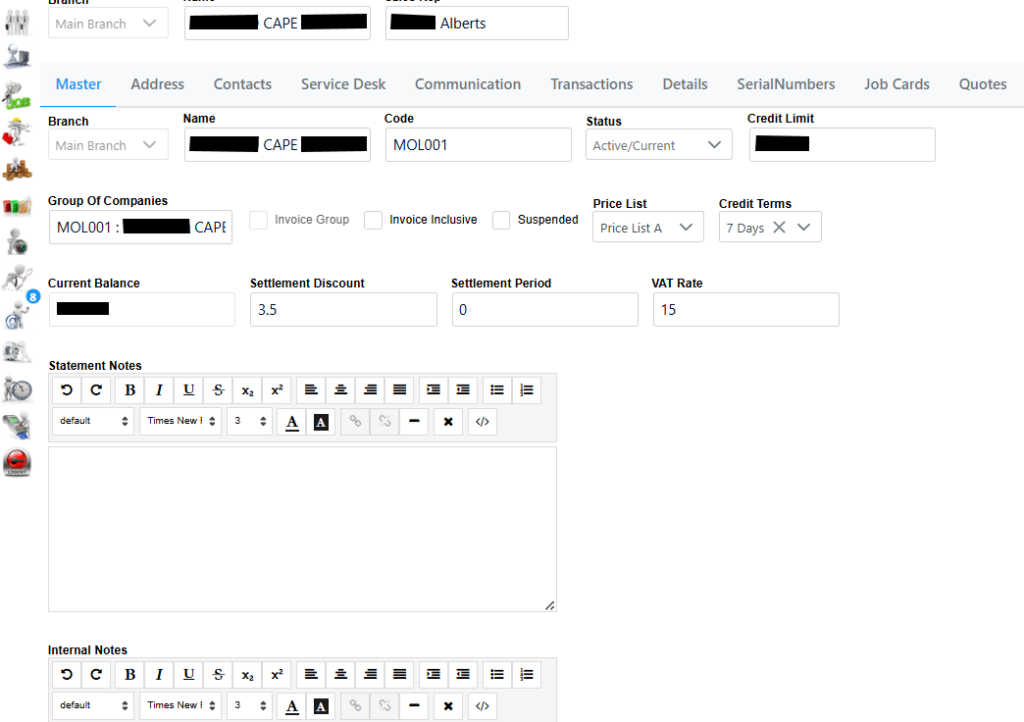
Status: Prospect, Active/Current or Archived which you can select accordingly.
Credit Limit: Can also be specified in the credit limit field. This limit will play a roll when it comes to invoicing, you won’t be able to invoice unless this amount is set higher than the invoice amount.
Suspended tick box: Allows you to suspend the account.
Price List dropdown: Standard Pricing and Price List A to D which is selectable related to the client. The Price List A to D can be configured in Inventory, item and Price Lists .
Credit Terms: Option of COD, 7 Days or 30 Days. More Credit Terms can be added in the Configuration Section, Customer, Credit Terms if needed.
Current Balance: Amount currently still outstanding on the account.
Settlement Discount: Percentage can also be specified for accounts settled sooner.
VAT Rate (Value-added Tax): Set the current Vat rate.
Statement Notes section: Notes can be added which will be displayed on the Statements.
Internal Notes: Used to capture any specifics about the client, save any important data such as infrastructure devices, networking details and so on which is then readably available to everyone using the system.