
Clients may submit support requests by emailing the service desk at Support@pbs-software.co.za. All incoming emails are recorded and reviewed by our support team. Requests will be assessed and, where applicable, formally logged as a service call and assigned for action. A reference number will be issued once the request has been processed. Clients are advised to use this reference number in all subsequent communication related to the request.
We can also be contacted on 0210072010 via telephone.
Required Information
To ensure timely processing, the following information must be included in the email:
- Detailed description of the issue or request
- Any relevant screenshots or supporting documents
Most pages will display Popups in case of error, incorrect value input or Success

A Success Message displays for couple of seconds and disappears.

A Warn Message displays for 10 seconds, you are able to click on the x to close it before.

An Error Message stays on screen permanently. You can also click the x to close the popup.
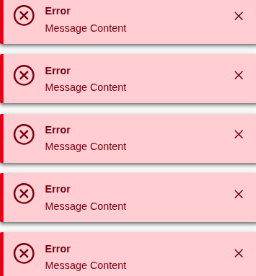
In the Event of bunch of Error popups, you can double click x to close all of them.
Relevant pop-up messages must be highlighted, copied, and included in the email to the Service Desk to ensure accurate reporting of the issue.