
On selecting a contact you will be presented with a summary including contact types this contact is a part of, as well as the 6 key contact details for your organisation (Default: First Name, Last Name, Email Address, Cell Number, Work Phone, Team Name). A photo of the contact will also display if available.
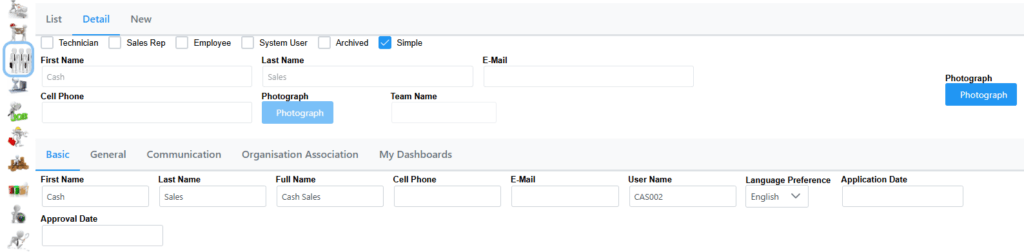
There are a number of tabs that could show based on your user access and on the type of contact that has been selected.
There are 5 different types of user access available as explained in the following section.
Technician: Gives minimal but sufficient access to Jobcards, ServiceDesk, Contacts and Customers to be able to do their work on the system.
Sales Rep:
Employee:
System User: Applies minimal but sufficient access to use the system in full.
Archived: Use this status to archive a user which will disable all access and association with any customer
Simple:
The Basic and General tabs are to show basic information. In the basic tab you can also change the Language Preference of the contact from English or Afrikaans. Changing it to Afrikaans will switch his/hers profile on the system to Afrikaans.
Communication lists all past communication with the contact.
In Notification Method you set the Preferred Communications method for example email or cell phone.
In Organization Association we use a multi selection to set organisations with which this contact is associated.
A contact can be associated with more than one Organisation.
The Confidential tab shows confidential information including username and password.
The Activity Tab shows any past edits to the contact if the user has access to Audit Log.