
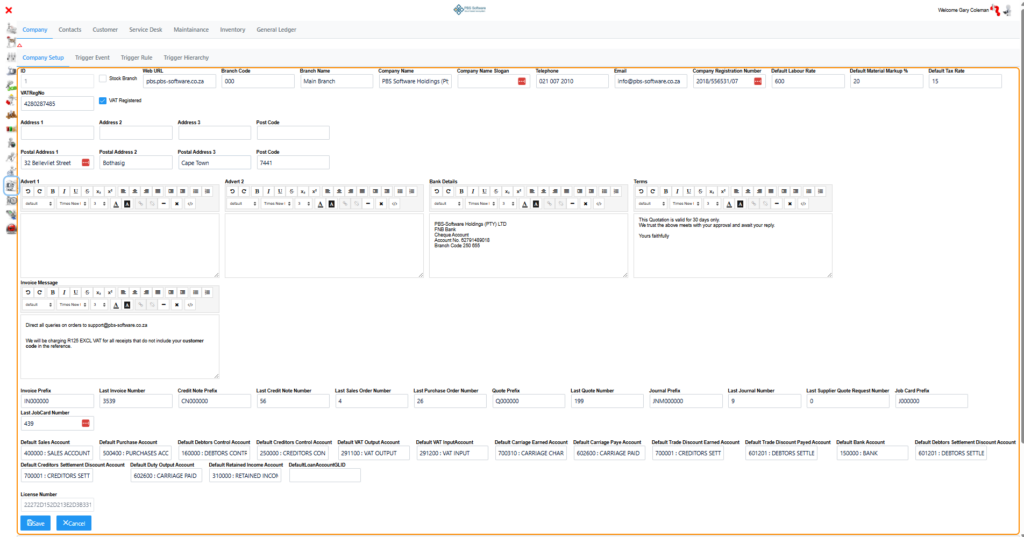
Company Setup once you have selected a Branch it will open an editable form.
Stock Branch – Is this a Stock Branch only?
Web URL – What is your companies website?
Branch Code – What Short code do you wish to use for this Branch? if Stock branch it must be a Code of the Non Stock branch to which it belongs.
Branch Name – Branch Name
Company Name – Company Name to show on Stationery.
Company Name Slogan – Company line 2 or Slogan printed below Company Name in smaller font.
Telephone – Branch Contact Number
Email – Branch E-Mail
Company Registration Number – Company registration number with registering authority.
VAT Registered – Is entity VAT Registered tick box.
VATRegNo – VAT or Customer Tax number
Default Tax Rate Default VAT to apply to customers and stock creation.
Default Material Markup % on PO Purchases what is the rate by which I would like to markup to attain selling price.
Default Labour Rate Default Labour Rate.
Address 1 – Physical Address
Address 2
Address 3
Post Code
Postal Address 1 – Postal Address
Postal Address 2
Postal Address 3
Post Code
Advert 1
Advert 2
Bank Details – Printed on Invoices and Statements.
Terms – Copied to Quotes but can be edited on a per quote basis
Invoice Message – Message that will go to clients of that Branch if automating Invoice sending.
Then you can amend sequence numbers as well as prefixes for most docs with references.
Invoice Prefix
Last Invoice Number
Credit Note Prefix
Last Credit Note Number
Last Sales Order Number
Last Purchase Order Number
Quote Prefix
Last Quote Number
Journal Prefix
Last Journal Number
Last Supplier Quote Request Number
Job Card Prefix
Last JobCard Number
Link all the correct GL accounts for the system to use.
Default Sales Account
Default Purchase Account
Default Debtors Control Account
Default Creditors Control Account
Default VAT Output Account
Default VAT Input Account
Default Carriage Earned Account
Default Carriage Paid Account
Default Trade Discount Savings Account
Default Trade Discount Allowed Account
Default Bank Account
Default Debtors Settlement Discount Account
Default Creditors Settlement Discount Account
Default Duty Output Account
Default Retained Income Account – Used for Year End Journal to close off income and Expenses
Default Loan Account – Used for Inter Branch transactions
Lastly you will see your current License Number but it is not editable and will be updated as needed by the system
License Number