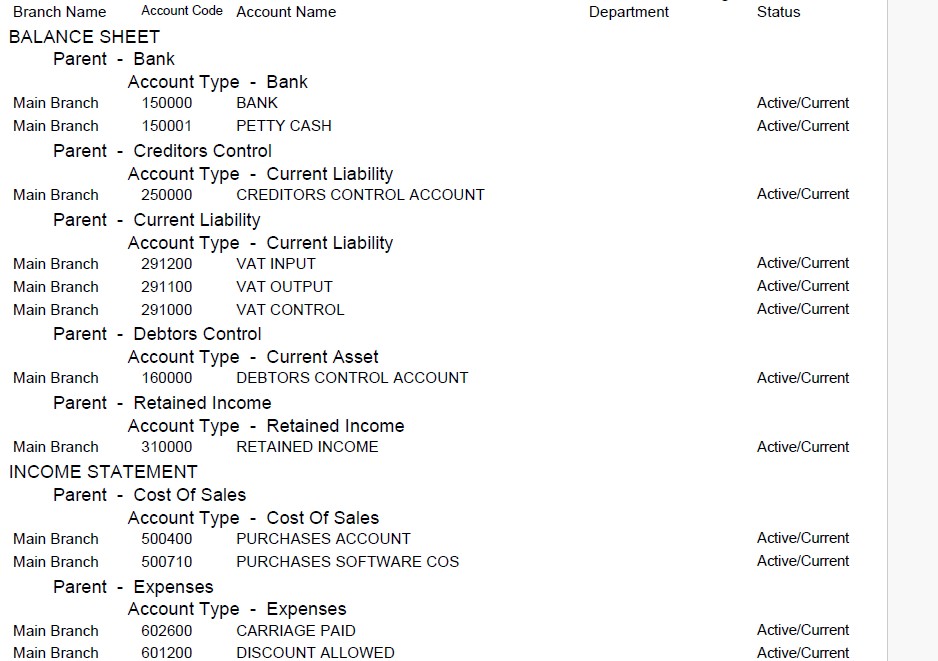
The General Ledger Accounts Listing, also called the Chart of Accounts (COA) is an organized list of all the accounts a business uses to record its financial transactions. Each account in the COA has a unique code or number and a description, making it easy to categorize and track money flowing in and out of the business. It serves as the foundation for the company’s accounting system and ensures that transactions are recorded consistently.
The accounts are usually grouped into main categories that reflect the structure of the financial statements: assets, liabilities, equity, income (revenue), and expenses. For example, assets might include cash, accounts receivable, or equipment; liabilities could include loans or accounts payable; income might include sales revenue; and expenses could cover salaries, rent, and utilities.
A well-designed COA provides clarity and flexibility. It helps management analyze financial data, makes it easier to prepare reports like the trial balance or income statement, and ensures compliance with accounting standards. Because every business is different, the COA is often customized to fit the size, industry, and reporting needs of the organization.
To print the Accounts List in PFIM open General Ledger.
This will present the filter :
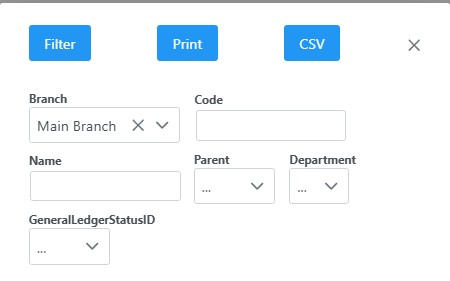
You can make your selection/s or leave all boxes blank. Clicking on the PRINT button on the filter window will print the List of GL accounts report.
The report will list all accounts according to your selection or if the the filter was blank, it will print all General Ledger accounts.
A sample of the report :