
A year-end close is the accounting process a business follows at the end of its financial year to finalize all accounts and prepare official financial statements.
The year-end close can also be described as the the official wrap-up of a company’s accounting year, ensuring accurate figures are carried into the new financial year and used for tax filings, audits, and management decisions.
It involves:
Recording all transactions for the year (sales, expenses, adjustments).
Reconciling accounts to ensure balances match supporting documents (like bank statements, supplier/customer accounts, loan balances).
Adjusting entries such as depreciation, accruals, and provisions.
Closing temporary accounts (like revenue and expense accounts) by transferring their balances into permanent accounts (usually retained earnings in equity).
Preparing financial reports such as the income statement, balance sheet, cash flow statement, and supporting schedules.
Locking the year so no further entries can be made for that period.
The steps in a typical year-end close process (most businesses follow a version of this, though the exact details depend on the size and complexity of the company):
Preliminary Review
Collect all financial records for the year.
Verify that all transactions (sales, purchases, expenses, payroll, etc.) have been entered.
Reconcile Accounts
Bank reconciliations – match bank statements to the general ledger.
Accounts receivable – confirm customer balances and note doubtful debts.
Accounts payable – verify supplier balances.
Loan & credit accounts – reconcile with lender statements.
Record Adjusting Entries
Accruals (e.g., unpaid expenses, earned but unbilled revenue).
Prepayments (e.g., rent or insurance paid in advance).
Depreciation and amortization.
Inventory adjustments (e.g., stock counts, write-offs).
Provisions (e.g., for bad debts, warranties, or taxes).
Review Revenue & Expenses
Verify all income and expense accounts are complete.
Check for unusual or one-time transactions.
Ensure expenses are properly categorized.
Close Temporary Accounts
Zero out income and expense accounts.
Transfer net income or loss into retained earnings (equity).
Prepare Year-End Financial Statements
Income Statement (profit & loss).
Balance Sheet (assets, liabilities, equity).
Cash Flow Statement.
Supporting schedules (fixed assets register, debt schedules, tax schedules).
Compliance & Reporting
File tax returns.
Submit reports for auditors (if applicable).
Share finalized reports with management, shareholders, or regulators.
Lock the Books
Prevent changes to the closed year in the accounting system.
Carry forward balances (assets, liabilities, equity) to the new year.
Doing the Year-end close in PFIM:
Open CONFIGURATION
Open GENERAL LEDGER
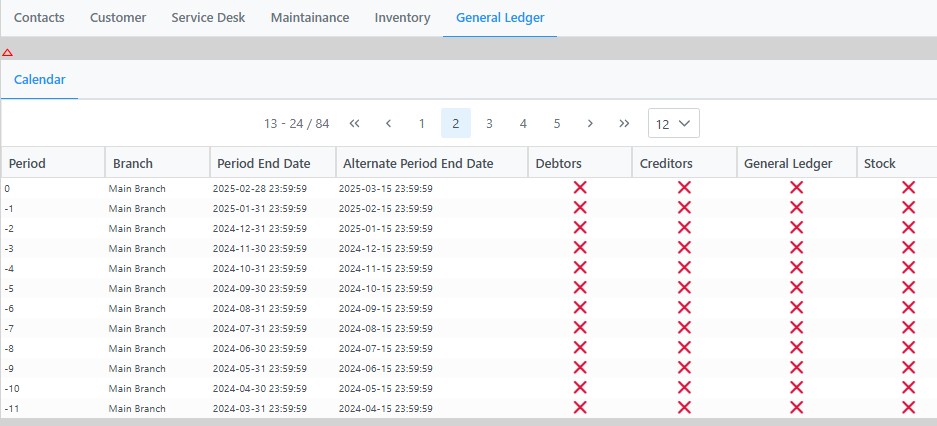
Right click on the period you want to close and the following window will appear:

Click on YEAR END CLOSE
please note the year-end can only be done on the end of financial periods like 0 , -11, -23 etc.
Yoy will now be presented with the following window:
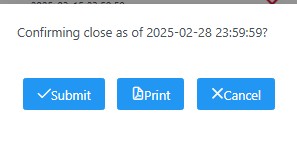
It is advisable to print the Year-end close report before you perform actual the year-end close.
The report show the GL accounts and the amounts to be written to Retained income.
Use this to compare to the journal that the year-end generates.
Clicking on the SUBMIT button will do the actual close-off by making the balance of all income and Expense accounts zero and writing the amounts to the Retained income account.
Printing the Journal
To verify the amounts per account written off you can print the journal.
Open GENERAL LEDGER and the GL accounts list appears:

Search the list for RETAINED INCOME or use the filter at the bottom right hand to search the list

Once you have located the Retained Income account click on Transactions:

and the list of transactions show:

Right click on the row you want to print and click PRINT
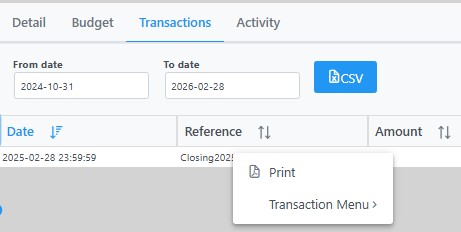
This will now print the journal that was created by the year-end procedure and it can be used to compare to the pre-yearend report.