
In Timesheet, time gets captured against the relevant Job Card or Fault Report Items (Service Desk Call)
On selecting Timesheet, you will see the following screen.
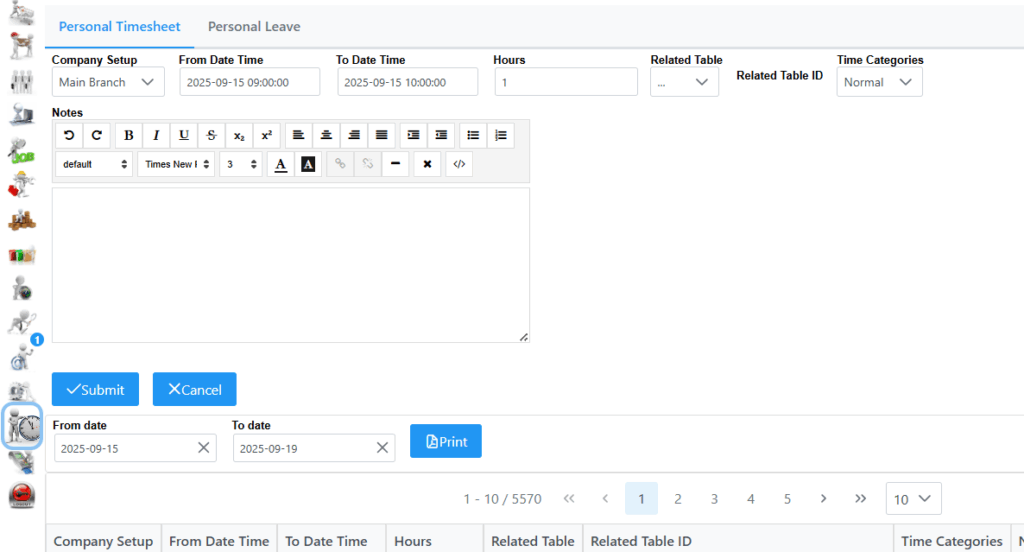
In Company Setup, the main branch is pre-selected, change branch accordingly if time needs to be logged against another branch. When selecting From and To date, you will be presented with a Calendar check box where you need to select the date and time. The Hours tab will be populated automatically based on the From and To date set.
Related table gives you 2 options to chose from, Jobcard and Fault Report Item. When selecting Jobcard, by typing first few characters of Jobcard or Debtor, a list will be displayed where the relevant Jobcard can be selected. When selecting Fault Report Item, by typing first few characters of Fault Report Item (Service Desk Call) or Debtor, a list will be displayed where the relevant Call can be selected.
Time Categories have 3 options to choose from, Normal, Overtime and Sunday.
If changes needs to be made to a line item, you can simply just select it and do the changes. Remember to click save.